Welcome reader! This time, we took it all the way: building an app that, in turn, builds entire applications. We call it ByteMason, and it takes a simple prompt—like "build me a to-do list app with user authentication"—and turns it into a fully functional Next.js 14 project with Supabase integration, authentication, and more.
Why We Built ByteMason
Our initial goal was to recreate a mini version of one of our apps, Lumeon, using nothing but a prompt. We wanted to see if we could streamline the entire process of building a Supabase-backed Next.js application, from planning to deployment.
At first, we imagined a sleek UI that anyone could click through. However, we started with a CLI tool to reduce risk and keep things practical. That pivot gave us a clear, simple foundation to test our ideas and learn from mistakes before building out a web interface.
Our Development Process
At Lumira Labs, we follow three steps for every major project:
- 1.Research & Specification
We spent a couple of weeks exploring how AI agents work, what tools were out there, and how to make our own.
- 2.Prototype
We built a minimal app to see if the concept was viable.
- 3.Development
We built the CLI, worked out the bugs, and scaled it into a stable product.
In the Research phase, we discovered an agent library—Codegen—that seemed powerful. But we quickly realized these tools were too opaque, costing us time and money without us truly knowing how they operated internally. So, we decided to build our workflow from scratch, giving us total control and insight into every step.
How It Works
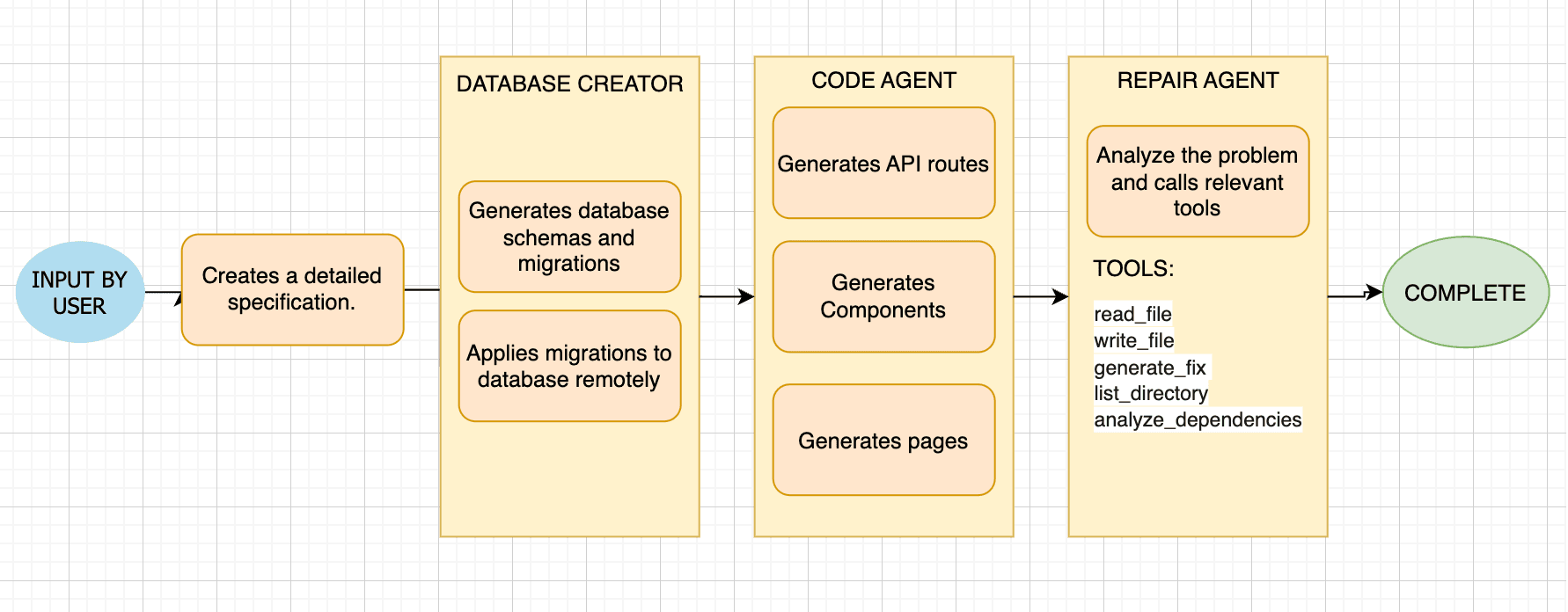
High level overview of the system
ByteMason is driven by a simple command sequence. You start by creating a project folder:
mason new Project-NameThen you provide a prompt that describes what you want to build:
mason plan "PROMPT"When you run this command, we process your request and show you exactly how it works behind the scenes.
Understanding What You Want
When you provide that prompt, ByteMason first processes it through the ProjectBuilder.understand_intent() method:
- Your prompt is sent to Claude 3.5 Sonnet with a specialized system prompt
- The AI extracts structured information into an Intent object containing:
- App name and purpose
- User types (roles)
- Core features with priority and complexity
- Data entities and attributes
- Authentication requirements
- Integration requirements
- Technical constraints
This transforms your idea—even if it's a bit vague—into something structured we can work with, without adding features you didn't ask for.
Planning Your Project
A specification file is generated from your prompt and saved in the specs/ folder. This happens through our create_spec() process:
- The Intent object is passed to the AI with a prompt that includes project architecture patterns
- It returns a structured ProjectSpec containing:
- Detailed pages layout and navigation flow
- Component hierarchy with descriptions
- API routes with methods and purposes
- Database tables with relationships
Setting Up Your Database
mason db setup spec_path // to setup supabase keys and generate migrationsmason db push // to push migrations to remote supabase projectHere, the SupabaseSetupAgent:
- Generates SQL migration scripts directly from your project spec
- Initializes a Supabase project connection
- Sets up proper environment variables
- Applies migrations to create your tables
We use standard Supabase CLI commands, not mysterious API calls, so you see exactly what's happening with your data.
Building Your Code Layer by Layer
mason code spec_pathThis is where things happen. Our CodeAgent generates code in a context-aware sequence:
- 1.API Routes First: Generates backend routes with database access
- Each route is properly typed with error handling
- Security best practices are built in
- 2.Components with API Context: Creates React components that know about your API
- Components are separated into client and server components
- Client components implement optimistic UI patterns
- 3.Pages with Full Context: Builds app pages that know about both APIs and components
- Uses proper Next.js 14 App Router conventions
- Everything is connected correctly
ByteMason also sets up any shadcn UI components it detects in the generated code.
Automatic Repair Agent
mason repairWhen you run this, ByteMason:
- Tries to build your application and captures any errors
- Analyzes the build output to understand what went wrong
- Uses a set of tools to fix each problem one by one:
- Reads files to check current content
- Writes fixes where needed
- Analyzes dependencies and import relationships
- Explores your project structure
It repeats this process until your build passes, with no human intervention required.
You get all the power of AI assistance without giving up control or understanding of your own project.
Key Lessons
- 1.Keep It Simple
Building our own code generation and repair workflow turned out to be more transparent than relying on a complex library we didn't fully understand.
- 2.Model Choice Matters
We tested both GPT-4o and Anthropic's Sonnet 3.5 models for code generation. Sonnet 3.5 had fewer errors in its outputs, though we occasionally hit rate limits.
- 3.Agentic Workflows Are Powerful
Agents that can plan, generate, and repair code can handle a surprising amount of complexity—much more than a simple "code spit out" approach.
- 4.From CLI to Next Steps
Starting with a CLI gave us clarity on what works.
The Outcome
In the end, we asked ByteMason to build a simple to-do list application. It set up the database, wrote the code, handled authentication, and even fixed its build errors—no human intervention required, beyond the initial prompt.
It's part of the story toward a future where building full-stack apps could be as easy as writing a quick note about what you want.